Home / How It Works
How it worksHow to get more Google reviews automatically
The whole system, step by step: what it does after each visit, what you do (almost nothing), what the emails say, and what happens when a customer writes back.
No calls needed. Fixed price. You own your accounts.
The four steps
Setup happens once. After that the system runs on its own, every day.
You fill in a setup form
How you book appointments, where your customer list lives, the email address to send from, and your Google review link.
You: about 10 minutes
I build and test it
I connect your list, write the emails in your voice, and run test sends to an inbox I control before any customer sees anything.
You: approve the wording by email
It runs after every visit
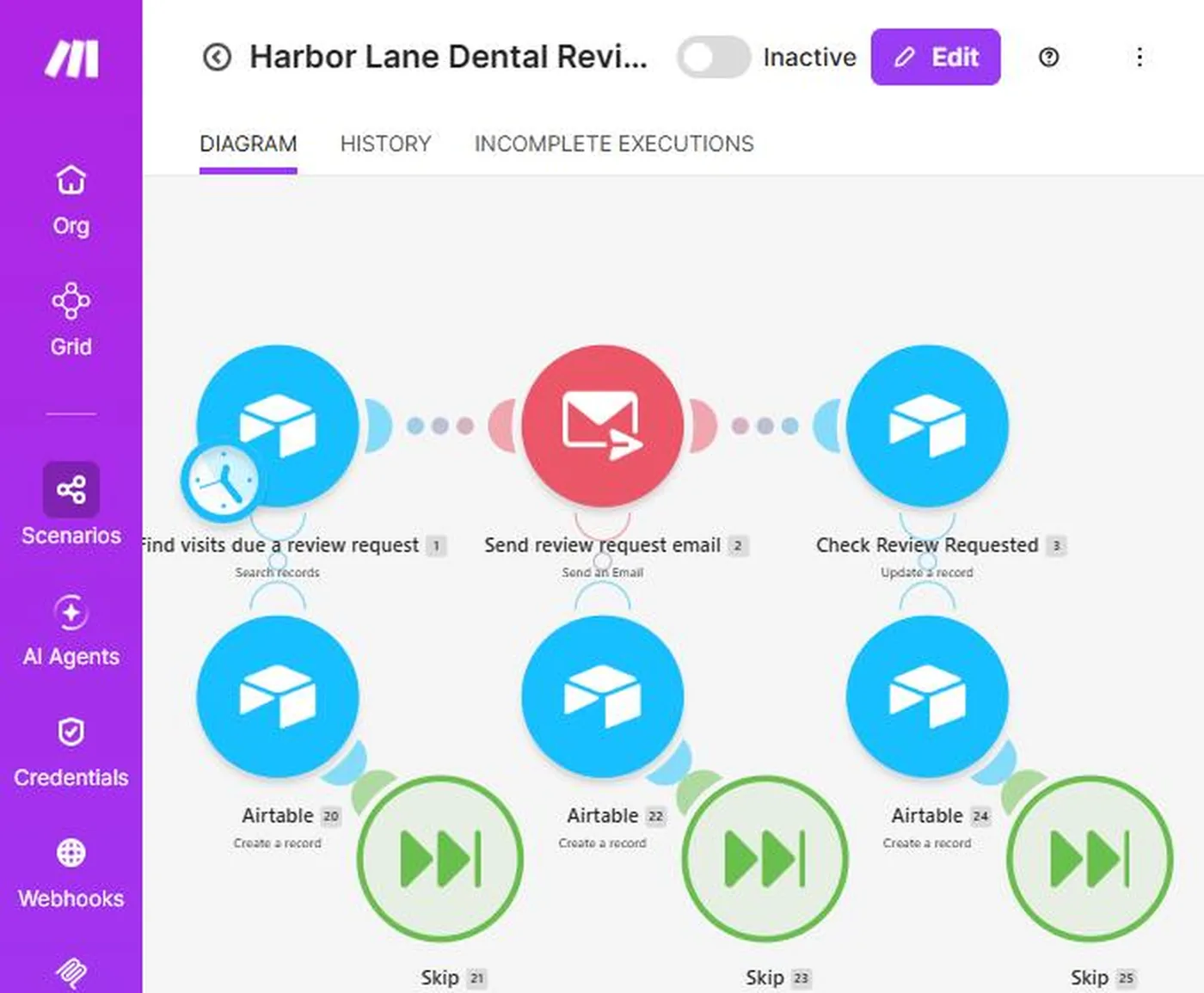
The system checks your list on a schedule, emails each new customer, follows up once, and logs every send and reply.
You: nothing
You get a monthly report
A short email with requests sent, follow ups, replies and any failures, so you know it is working without logging in.
You: read one email a month
What the email says
Here is sample wording. I write yours in your voice, and you approve it before anything goes out.
Hi Jordan,
Thank you for coming in today. If you have a minute, would you leave us a quick Google review? It helps neighbors find us, and we read every one.
Leave a Google review
Thank you,
Dana and the team at Your Business
Hi Jordan,
Just a gentle reminder in case our last note got buried. A short review on Google makes a real difference for a small business like ours. If now is not a good time, no worries at all.
Leave a Google review
Thanks again,
Dana
The email never mentions what the customer bought or what treatment they had. It names your business and links to your review page, nothing more.
What happens to unhappy replies?
Every customer gets the same request. The system never screens people out or hides the review link from anyone.
Some customers reply to the email instead of leaving a review. Those replies land in your normal inbox, because the email came from your address, and the reply is logged on the customer's row. If someone is unhappy, you hear about it directly and can make it right personally.
Who owns the accounts?
You do. The system is built inside accounts in your business name: your email, your spreadsheet, and the account that sends the emails. You pay any app subscription directly.
I never keep your passwords after handoff. If you stop the care plan, or never take it, the system keeps running exactly as before.
Timing, in plain words
The first request
By default the request goes out the day after the visit. A salon might want the same evening. A home service company might want the morning after the job closes.
The one follow up
Three days later, only if the customer has not responded. After that the customer is never asked again for that visit.
Regular customers
For people who visit often, I set a quiet period, such as once every 90 days, so regulars are not asked after every appointment.
Going live
I aim to have your system live within 7 days of receiving your setup form, after you approve the wording.
See it work
Harbor Lane Dental is a made up dental office I built this system for, so you can watch it run before you spend anything.
Captioned, no sound, 60 seconds. Open the video file
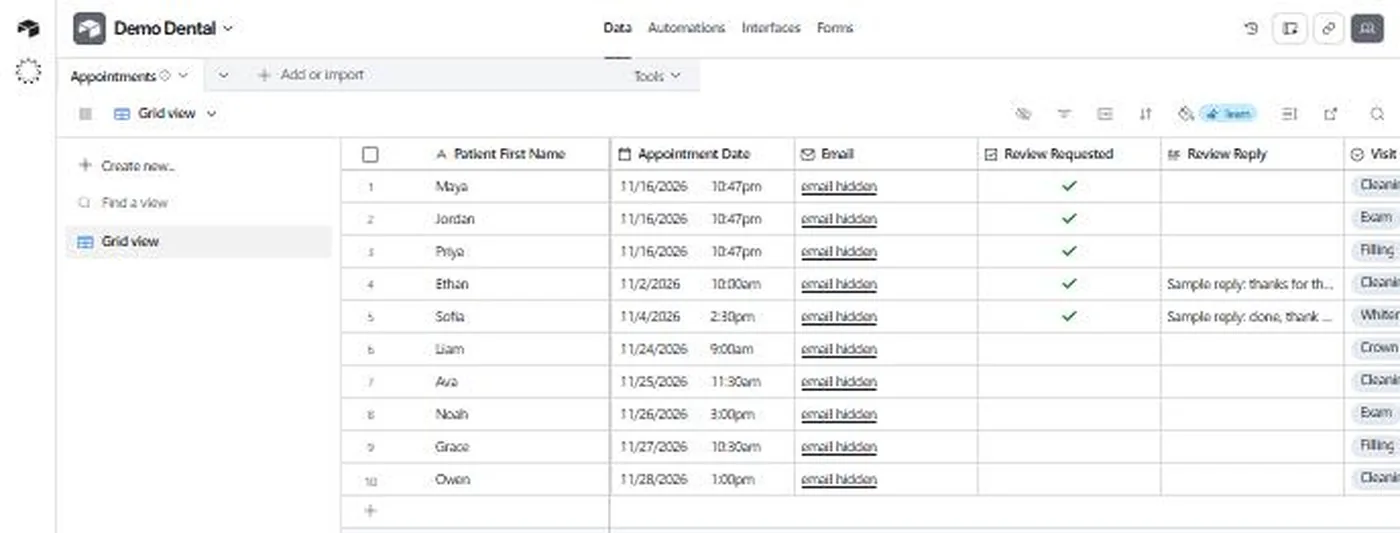
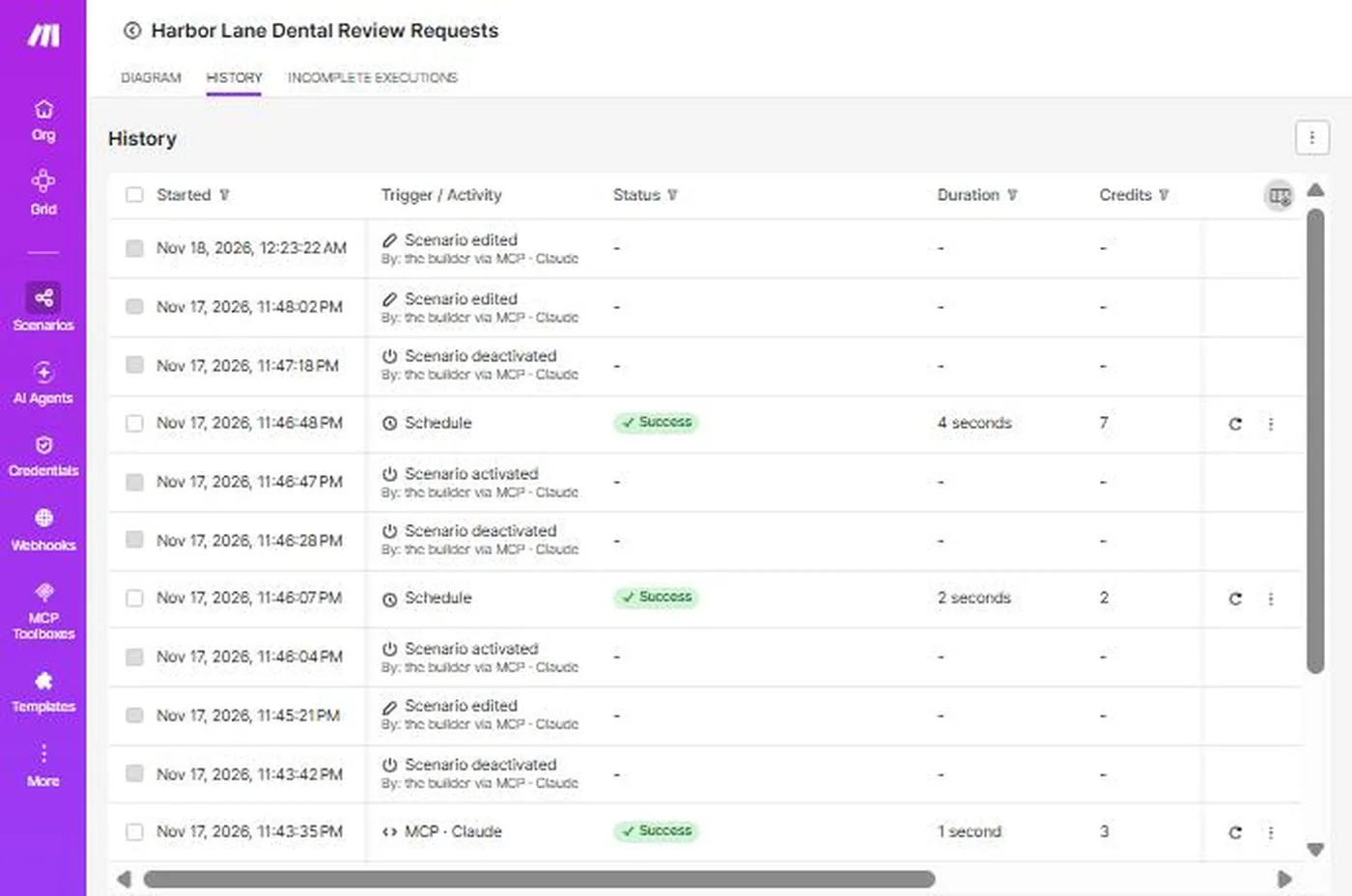
From one test run on 17 November 2026 with 3 sample appointments. These numbers show the system working. They are not results for a real business. Harbor Lane Dental is a made up name and is not connected to any real practice.
What it costs
One setup price and an optional care plan. The care plan is month to month, with no percentage of anything and no surprise fees.
If the setup needs a paid app plan, you pay it directly, and I tell you before I start. That way every account stays in your name.
Also for med spas: a text back for every missed call.
Questions business owners ask
What do I need to get started?
Three things: a list of appointments or finished jobs that includes customer email addresses, an email account to send from, and your Google Business Profile so I can use your review link. If your booking tool can export that list or send it to a spreadsheet, the rest is setup work I handle.
When is the review request sent?
The default is the day after the visit, while the experience is still fresh, with one follow up three days later if there is no response. Both times are settings. A salon might prefer the same evening, and a home service company might prefer the morning after a job is marked complete.
Who owns the accounts and the data?
You do. Everything is built inside accounts in your business name, using your own email and your own logins. I never hold your passwords after handoff, and your customer list never sits in an account you cannot open. If we stop working together, the system keeps running.
Can I change the wording later?
Yes. The email wording, the subject line, the timing and the follow up are all stored where you can edit them. Your written handoff notes show exactly where each setting lives, and the short screen walkthrough shows a change being made, so you never have to wait on me.
What if my booking software cannot export customers?
Most booking and practice tools can export a daily list or send it to a spreadsheet. If yours cannot, the free demo will say so plainly before you pay anything. In some cases a simple daily upload by your front desk works, and it takes less than a minute.
Can review requests go out by text message?
The standard setup uses email. A text message package is available on request for $397 a month plus $250 setup, because texting needs a separate sending service and customer consent records. Ask for it in the free demo form and I will tell you whether it suits your business.
Built for your kind of business
The right moment to ask is different for every business. Each page below covers timing, sample wording and common worries.
Google reviews for dentists
Cleanings, new patients and patient privacy.
Google reviews for med spas
Treatments with delayed results and members who visit often.
Google reviews for salons
Regulars, stylists and the same evening request.
Google reviews for home services
Finished jobs, technicians and multi day projects.
For the curious, how it is built
These screenshots come from the Harbor Lane Dental demo. The demo runs on Make, Airtable and a standard email account. For your business, the same setup is built in accounts in your own name, so you never have to open any of it.
Get your free demo
Send me your name, your business name and an email address. Within one business day I email you a free demo: the real review email your clients would get, with your business name on it. No call needed.
Your details are used only to reply to this request. See the privacy policy.
Last updated 24 November 2026
Also for other local businesses: dentists, salons and home services.